Creating quizzes, tests, and assessments can take teachers hours, especially when they need different question types, difficulty levels, and versions for different students. AI quiz generators can simplify this process by creating questions...
Creating quizzes, tests, and assessments can take teachers hours, especially when they need different question types, difficulty levels, and versions for different students. AI quiz generators can simplify this process by creating questions, answer choices, assessments, and practice activities in minutes.
From generating questions from a lesson or document to creating interactive quizzes, these tools help teachers spend less time on assessment preparation and more time supporting student learning.
What Are AI Quiz and Assessment Tools?
AI quiz and assessment tools use artificial intelligence to help teachers create questions and learning activities automatically. Depending on the platform, teachers can generate multiple-choice questions, true-or-false questions, short-answer questions, flashcards, and other assessment formats.
Many tools can also generate quizzes from existing content such as lesson plans, PDFs, presentations, videos, or text. This makes it easier to turn existing teaching materials into assessments without creating every question manually.
Best AI Tools for Creating Quizzes and Assessments
1. Quizizz
Quizizz is an AI-powered assessment platform that helps teachers create interactive quizzes and learning activities. Its AI features can generate questions based on prompts or existing instructional content.
Best for: Interactive classroom quizzes and student engagement
Key features:
AI-generated questions
Interactive quizzes
Multiple question formats
Live and asynchronous assignments
Student performance reports
Quizizz is particularly useful for teachers who want to combine assessment with gamified learning.
2. Kahoot!
Kahoot! is a popular game-based learning platform that allows teachers to create engaging quizzes and classroom assessments. Its AI capabilities can help generate questions and adapt content for different learning activities.
Best for: Gamified classroom assessments
Key features:
AI-assisted question generation
Interactive quizzes
Live classroom games
Self-paced assignments
Student performance insights
Teachers can use Kahoot! to turn traditional quizzes into more engaging classroom activities.
3. QuestionWell
QuestionWell helps educators generate questions from existing learning materials. Teachers can provide content, and the platform can create questions that can be exported or used in different learning environments.
Best for: Generating questions from lesson content
Key features:
AI-generated questions
Multiple question types
Question editing
Content-based question generation
Export options
QuestionWell is useful when teachers already have lesson materials but need help converting them into assessment questions.
4. MagicSchool
MagicSchool is an AI platform designed specifically for educators and includes tools for generating assessments and quizzes. Teachers can provide a topic, grade level, and other requirements to create classroom-ready materials.
Best for: Teachers who want an all-in-one AI teaching assistant
Key features:
Quiz and assessment generation
Grade-level customization
Question creation
Lesson planning tools
Rubric and worksheet generation
Its broader collection of educator-focused tools makes it useful for teachers who want assessment creation alongside other AI teaching workflows.
5. Brisk Teaching
Brisk Teaching provides AI-powered tools that help educators create instructional materials and assessments. It can work with existing educational content and help teachers generate questions and activities.
Best for: Creating assessments from existing teaching materials
Key features:
AI assessment generation
Question creation
Content transformation
Personalized learning materials
Teacher-focused AI tools
Brisk can be especially helpful when teachers want to transform existing resources into new classroom activities.
6. Conker
Conker is designed to help educators create quizzes and assessments quickly using AI. Teachers can enter a topic or learning objective and generate questions based on their requirements.
Best for: Fast quiz creation
Key features:
AI-generated quizzes
Multiple question formats
Grade-level customization
Standards-aligned assessment options
Shareable quizzes
Conker is a strong option for teachers who need to create assessments quickly without starting from scratch.
7. Formative
Formative combines assessment creation with real-time student feedback. Teachers can create questions, distribute assessments, and monitor student responses.
Best for: Real-time formative assessment
Key features:
Multiple question types
Real-time responses
Instant feedback
Student progress tracking
AI-assisted assessment features
Formative is useful for teachers who want to assess student understanding during a lesson rather than only through traditional tests.
Quick Comparison of AI Quiz Tools
AI Tool
Best For
Key Strength
Quizizz
Interactive quizzes
Gamified assessments
Kahoot!
Classroom engagement
Game-based learning
QuestionWell
Question generation
Turning content into questions
MagicSchool
All-in-one teaching
Educator-focused AI tools
Brisk Teaching
Content transformation
Creating assessments from resources
Conker
Fast quiz creation
Quick AI-generated assessments
Formative
Formative assessment
Real-time student feedback
How AI Tools Help Teachers Create Better Assessments
AI assessment tools can support teachers at several stages of the assessment process.
Save Time on Question Creation
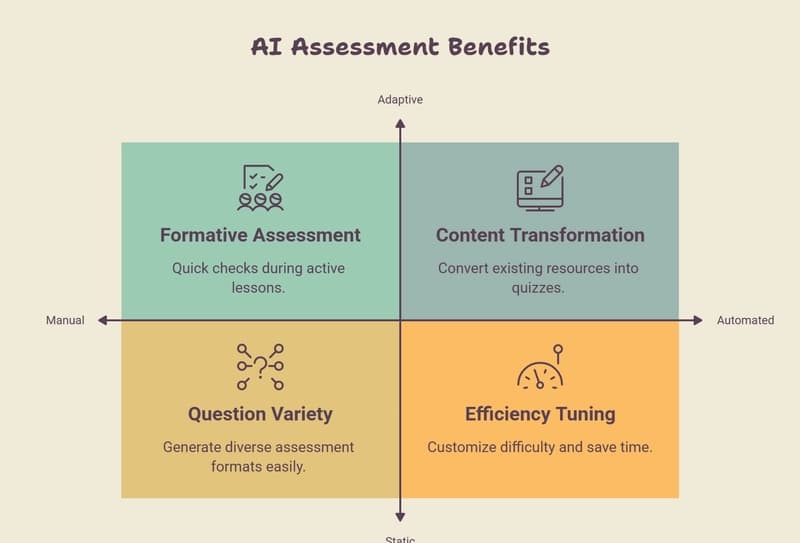
Instead of writing every question manually, teachers can provide a topic, lesson, or learning objective and let AI generate an initial set of questions.
Teachers can then review, edit, and customize the questions before sharing them with students.
Create Different Question Types
AI tools can generate multiple-choice, true-or-false, short-answer, matching, and other question formats. This gives teachers more flexibility when assessing different types of knowledge.
Adjust Difficulty Levels
Many AI tools allow teachers to specify student age, grade level, or difficulty. This can help create assessments that are better suited to the learners' current level.
Turn Existing Content Into Quizzes
Teachers don't always need to create assessment content from scratch. AI tools can transform lesson notes, documents, articles, and other resources into questions and quizzes.
Support Formative Assessment
AI-generated questions can be used for quick checks during lessons. Teachers can identify areas where students are struggling and adjust instruction accordingly.
How to Choose the Best AI Quiz Generator
Before choosing an AI assessment tool, consider the following factors:
Question quality: Look for tools that generate accurate, relevant questions that require minimal editing.
Customization: Check whether you can control grade level, subject, difficulty, question type, and learning objectives.
Ease of use: Teachers should be able to create and share assessments without a complicated setup process.
Integrations: If your school uses an LMS or other classroom technology, check whether the tool integrates with your existing workflow.
Analytics: Student performance reports and insights can help teachers identify learning gaps.
Privacy and security: Schools should review how student information is collected, stored, and processed before adopting an AI assessment platform.
Tips for Using AI to Create Better Quizzes
AI-generated assessments should be treated as a starting point rather than a finished product. Always review questions for accuracy, clarity, age appropriateness, and alignment with your learning objectives.
A few best practices include:
Provide clear topics and learning objectives.
Specify the grade level and student ability.
Ask for a mix of easy, medium, and challenging questions.
Include different question formats.
Review AI-generated answers before publishing.
Remove ambiguous or repetitive questions.
Align questions with what students were actually taught.
Use assessment results to identify learning gaps.
Final Thoughts
AI quiz generators can significantly reduce the time teachers spend creating assessments while making it easier to develop engaging and varied learning activities. Tools such as Quizizz, Kahoot!, QuestionWell, MagicSchool, Brisk Teaching, Conker, and Formative offer different approaches to AI-assisted assessment creation.
However, AI should support—not replace—teacher judgment. Reviewing generated questions and ensuring they match curriculum objectives, student needs, and classroom context is essential.
If you're looking for more ways to save time with AI, explore our guide to the top AI tools for teachers to discover additional tools for lesson planning, content creation, classroom management, and personalized learning.